Profile-photo lighting by purpose: job, business, branding and artist portraits
Compare clear job-application light, dimensional business portraits, approachable personal branding and character-driven artist headshots.
Not every profile needs the same suit-and-backdrop treatment. A job photo favors recognition, business portraits may need composed depth, branding can feel approachable, and artist portraits can use stronger character. These are editorial suggestions, not a guarantee of compliance with any employer or institution.
Which light suits which situation?
Placements and angles are editorial starting points informed by lighting principles, not fixed rules. Adjust source size, distance and position for the space and subject. The mood examples do not reveal measured equipment settings or exact output.
Job applications: clear and composed
When to use it: For showing the face clearly in a work-application context.
Intended mood: Gentle shadows and readable eyes feel reliable.
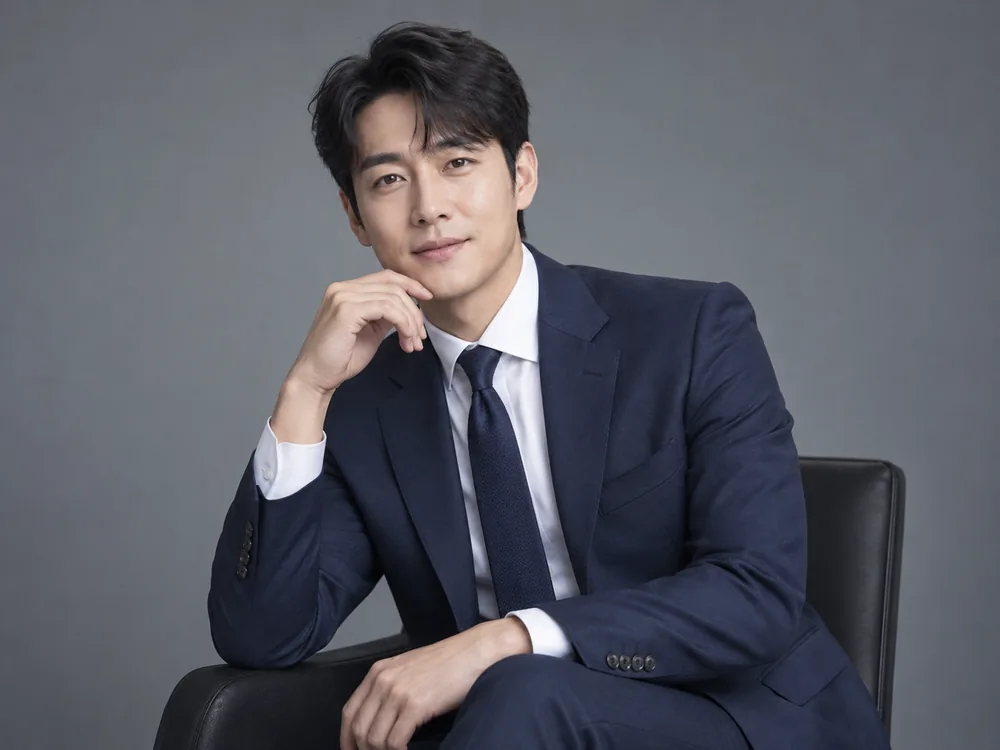
- Key position
- Place a broad diffused key near the camera axis, about 0–30 degrees to one side and slightly above eye level.
- Fill and grouping
- Use a white reflector opposite the key or below the face to gently lift under-eye and chin shadows.
- Distance and backdrop
- Keep a simple backdrop separate from the subject and visually quieter than the face.
- What to inspect
- Adjust exposure after checking both eyes and skin detail. Increasing output alone does not make a source softer.
Context-specific adjustment: Check the actual submission rules and avoid automatically adding deep side shadows.
Business: composed dimension
When to use it: For websites, introductions and business materials.
Intended mood: Ordered wardrobe and gradual facial contrast suggest calm confidence.

- Key position
- Start with a large softbox or diffused key about 30–45 degrees to one side of the camera and slightly above eye level.
- Fill and grouping
- Add a white reflector on the shadow side, retaining enough shadow to describe form.
- Distance and backdrop
- Adjust the key and backdrop brightness separately so the subject remains distinct.
- What to inspect
- Check catchlights and nose shadows before increasing power. Reposition the source when glasses obscure the eyes.
Context-specific adjustment: Do not create a profession or title, or confuse an authoritative mood with an unreadably dark face.
Branding and social: approachable
When to use it: For personal channels, introductions and a welcoming public presence.
Intended mood: Soft window light and environmental context feel warm and natural.

- Key position
- Use a broad window about 45 degrees to the side, avoiding direct sun on the face; diffuse it with a sheer curtain when needed.
- Fill and grouping
- Use a white wall or reflector opposite the window to retain detail in the darker cheek.
- Distance and backdrop
- Check whether warm room lights and daylight create different colors on either side of the face.
- What to inspect
- Compare face direction and distance from the window, then rebalance exposure rather than assuming every window produces the same light.
Context-specific adjustment: Keep a useful sense of place without letting decoration outshine the face.
Actors and artists: character
When to use it: For a portfolio or editorial needing a distinctive mood.
Intended mood: Directional shadows and a restrained backdrop add focus and personality.
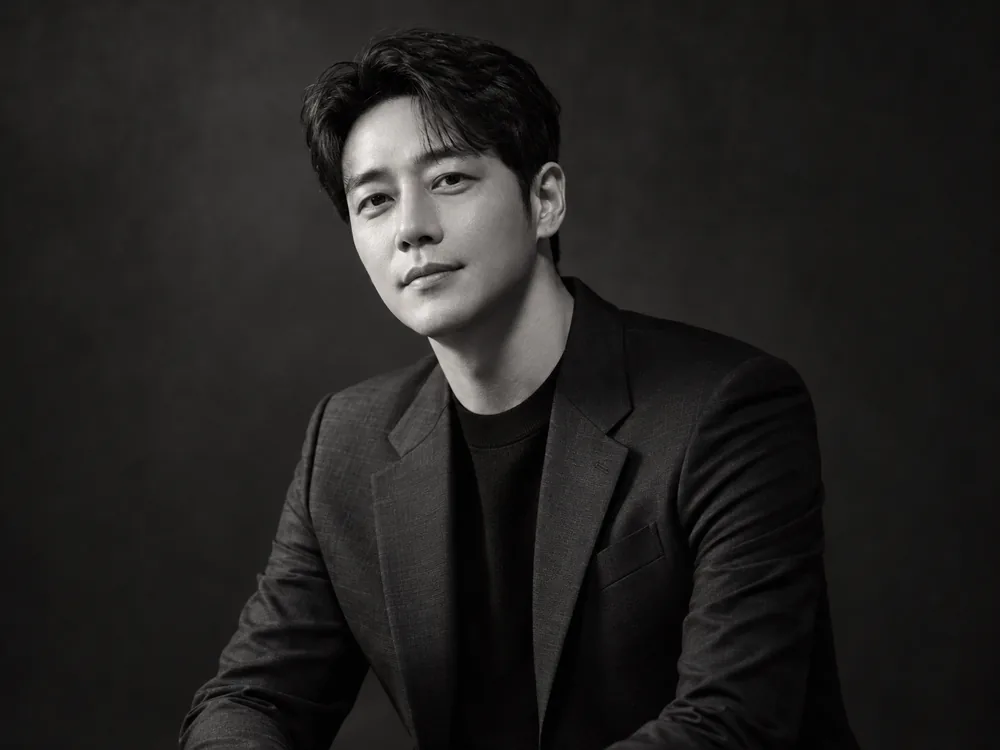
- Key position
- Start with a directional key about 45 degrees from the camera and slightly above the eyes.
- Fill and grouping
- Reduce fill or move the reflector away to retain shape, without losing the eyes and mouth.
- Distance and backdrop
- Against a darker backdrop, separate only the hair or shoulder edge that needs it.
- What to inspect
- Judge the actual face and glasses reflections rather than forcing a named Rembrandt pattern or a fixed angle onto every subject.
Context-specific adjustment: Create mood through light and expression rather than changing facial identity; keep the eyes readable.
What to check in the result
- Check intended use and submission rules
- Separate desired mood from actual facial features
- Inspect glasses and dark clothing against the backdrop
Lighting questions for this portrait
Should job and actor headshots use different light?
Broad near-frontal light is a useful job-photo starting point. Actor or artist editorials may use directional contrast where the intended use allows it, while retaining recognizable features.
Is there a dedicated actor-profile menu?
Current profile subtypes are standard, business, job and personal branding. For actors, writers or artists, choose personal branding or personal editorial and specify the purpose and mood in additional direction.
Were these examples actually photographed with these setups?
No. They are AI-created mood illustrations and the placements are editorial proposals. They are not measured comparisons of output, color or shadows, or documentary photo sessions of the same person.
Does choosing light in Memory Photo automatically generate an image?
Memory Photo prepares a prompt. You attach the prompt and original photographs directly to an external AI and inspect identity, subject or pet count and the actual lighting expression in the result.
Apply it in Memory Photo
Choose the photo category and subtype, then the location, light and pose. Describe the desired light direction and mood in additional direction. Attach the completed prompt and source photographs directly to your selected AI conversation.
Open the photo studio ↗